When something needs you
Every message that asks for a person, and exactly what to do about it.
Updated 2026-09-30
What it does#
Most nights nothing here needs you. When something does, the report says which game, what stopped it, and the one action that fixes it. This page is the whole list, with the fix beside it.
Two kinds of line exist, and the difference matters:
- Needs an account or a person - a launcher is signed out, or a game belongs to an account nobody has signed in. The updater is working correctly; it simply may not act.
- Could not confirm - it did not manage to check. Not a claim that anything is broken; the next run usually settles it.
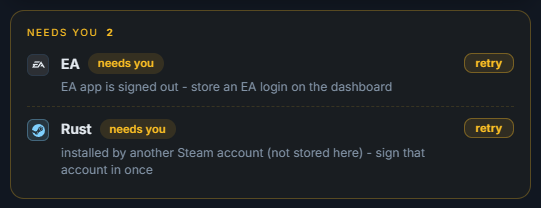
Your dashboard keeps the current list at the top of Overview, each line with a retry button for when you have done the fix:
How to use it#
| The message says | What to do |
|---|---|
| Steam is open but nobody is signed in - it is waiting at the "Who is playing?" account picker | Sign the account in on the server, or store its login on your page so the updater can |
| installed by 'bob', but Steam is logged in as 'alice' | Store bob's login, or sign bob in on the server, then send /update for that game |
| installed by an account this server has never signed in as | Somebody must sign that account in once on the server; nothing else can update those games |
| Steam wants a Steam Guard code | Reply /code with the code from your phone or email |
| Battle.net wants a security code / EA wants a verification code | Reply /code with it |
| Steam rejected the password stored for 'bob' | Update that password on your dashboard |
| Windows is locked on this server, so I could not read or type anything on its screen | Unlock the server session, or leave it signed in; the updater needs a desktop. The message now says WHY it is locked - a remote-desktop (RDP) window closed without signing out (sign out instead of closing it), a screen lock that asks for the password after N minutes (ask your provider to switch it off), or someone pressing Windows key + L |
| Steam shows this error on its own Downloads page for this game: "..." | Steam itself is refusing the download and the updater quotes its words. If it says access to the files is denied: close the game and its anti-cheat, make sure no antivirus blocks the folder, and that the Windows user Steam runs as may write to the game folder (Properties > Security). If it says no disk space: free some space on that drive. Then press Retry in Steam. The updater cannot fix this one, so it is not counted as an updater fault |
| Windows auto-login: OFF - after a power cut this server stops at the login screen | Turn on automatic login, so a power cut cannot silence everything |
| EA never got past its LOGIN SCREEN | Sign the EA app in on the server, ticking stay signed in |
| EA still could not connect to its servers after its own Restart App | The server could not reach EA. Check its internet connection and that no firewall blocks the EA app; the next run tries again |
| Epic is signed out on this server (its saved login expired) | Sign in to Epic once on the server, or store the Epic login on your page as "Epic" - the updater then signs it in itself |
| these games are behind but Epic downloaded nothing | Open Epic on the server, check it is signed in and set to update games automatically |
| to start it I accepted HoYoverse's updated Terms of Service and Privacy Policy | Nothing to do - HoYoPlay asked for it before a download, and the updater answered so the update could start |
| HoYoPlay stopped at its updated Terms of Service and Privacy Policy notice, and its Accept button could not be pressed | Open HoYoPlay on the server once, tick both boxes and press Accept. The download starts then, and the next run checks it |
| the Riot client never reported a patch status | Open the Riot client on the server once; the sentence says which of three causes it is |
| client stuck in 'DependencyUpdate' - this machine runs a Windows Server edition | Valorant's anti-cheat cannot install on Server editions; press OK on its error box and sign in, and it patches |
| VK Play has build 30 for it but its auto-update is OFF | Turn on automatic updates for that game in VK Play, or let the updater do it |
| no disk space | Free space on the game disk; the download was refused before it started |
| license is not valid (expired?) | Contact your provider to renew; see Licence and renewal |
| a launcher's program could not be found | That launcher moved or was uninstalled; tell your provider, or switch it off on your dashboard |
| did not open: its program closed after 1.4 s after it was started, with error code -1 | The launcher crashes on start - usually right after it updated itself. Open it once on the server desktop; if it shows an error or will not open, repair or reinstall it |
What the reply means#
Lines are grouped by reason, not by game: one signed-out account blocking fourteen games is one line naming a few of them and "and 11 more". Fixing the cause clears them all.
"Could not confirm" lines (still downloading, could not check, unverified) are left alone on purpose - the next run reports them properly rather than guessing tonight.
When something needs you#
If the same line comes back three nights running after you have done what it says, send /logs and forward it to your provider. That is the point where something in the launcher itself, not the cafe, is wrong.