Starting an update (/update)
Updating everything or one game, what the progress message means, and what a targeted run leaves alone.
Updated 2026-09-24
What it does#
/update does now what the nightly would do later. It opens each launcher, lets it download, and reports the same grouped summary. A run you start yourself always runs, even while the cafe is paused.
How to use it#
| What you send | What happens |
|---|---|
| /update all | Every launcher, in order. This is the full round the nightly does. |
| /update cs2 | One game. The name from /games or from the buttons after /check works. |
| /update steam | One launcher and all of its games. |
| /update epic:grand theft auto v | When the same game is installed from two stores, name the store first. |
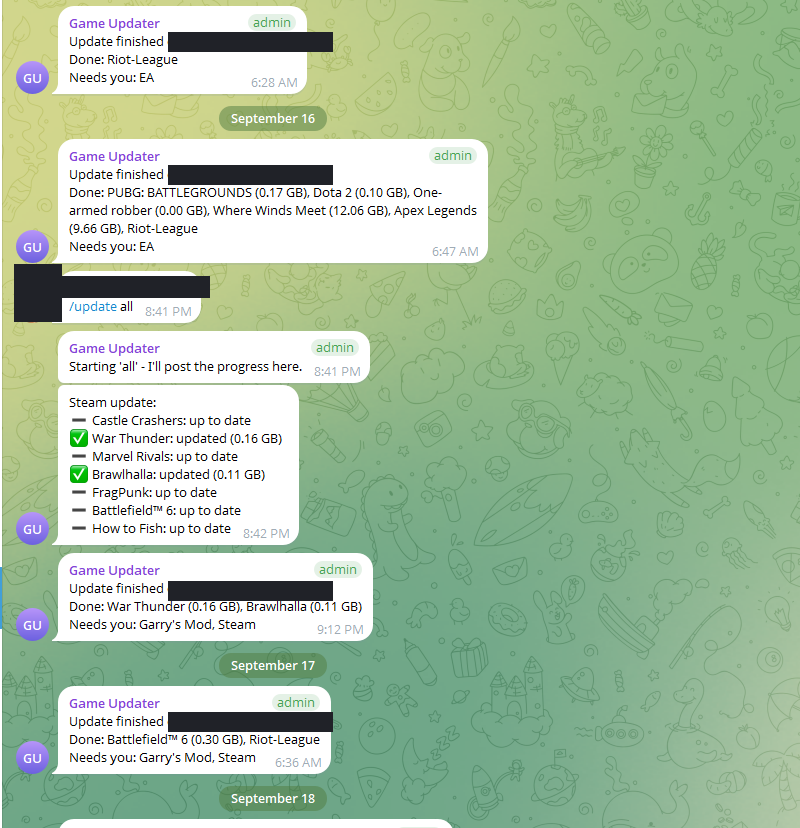
While it runs, the bot edits one progress message rather than sending a stream: each launcher shows its games as "checking", a percentage, "up to date" or "updated". The final summary replaces it at the end.
Note: Only one run at a time. If one is already going, the bot says so instead of starting a second - send /stop first if you want to take over.
The Update all now button on your dashboard does the same as /update all.
What the reply means#
- "Starting 'all' - I'll post the progress here." The run is going; the next message is progress.
- "An update is already running" - wait for its summary, or /stop it.
- "That cafe is offline - queued" - the server is not answering right now; the command waits for it (a few minutes for an update, a day for a pairing).
- The summary is read the same way as the nightly one: The nightly report, line by line.
A targeted run (/update cs2) only reports that game. It does not re-check the rest, so your dashboard keeps showing what the last full run found for the others.
When something needs you#
- A big download is still going when the run ends. That is normal and it is said plainly: the launcher keeps downloading on its own and the next run confirms it. Nothing is lost.
- "YOU NEED TO DO SOMETHING" lines come with the fix; see When something needs you.