The new-updates channel
The shared channel that posts each new game update once, for everyone.
Updated 2026-10-06
What it does#
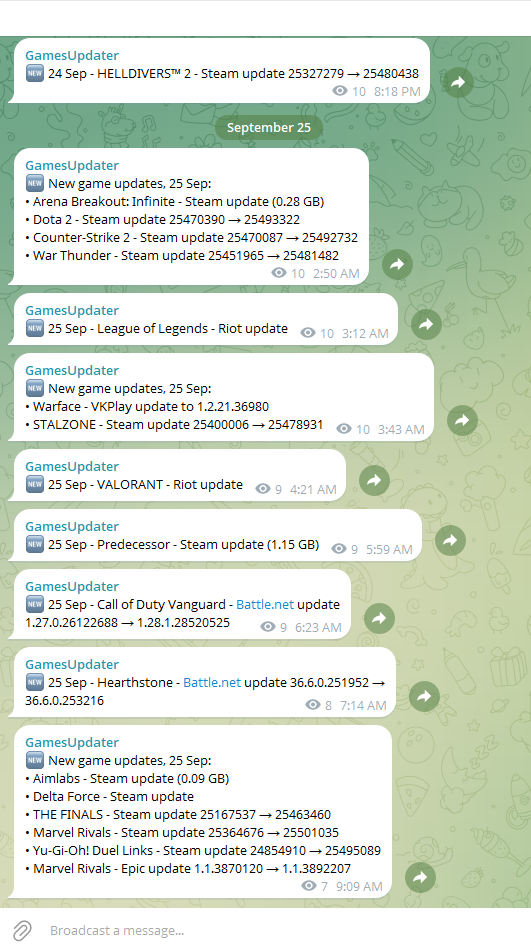
One Telegram channel for every cafe using GamesUpdater. When a game update appears anywhere in the fleet, it is posted there once, with its launcher and size (Telegram shows the date above each day's posts):
Dota 2 - Steam - 82 MB
Fortnite - Epic - 6.20 GB
World of Warcraft - Battle.net
It is a heads-up about the games, not a report about your server.
How to use it#
Ask your provider for the invite link and join. Nothing else to do: you read it, you do not send anything there.
It is useful for two things: knowing a big patch has landed before your customers arrive, and seeing that a game you also run has already updated somewhere else.
What the reply means#
- One post per update, whichever cafe got it first. A cafe that catches up on the same version a day later adds nothing; a newer version is a new post at once. A game sold in two stores (Apex Legends on EA and on Steam) gets a post for each, because they update separately.
- Only real updates. A game is posted when an update is proven - the version on the server moved forward, or the download finished - including updates a launcher did on its own between two checks. A download still running, a file check or a sign-in is never posted.
- The size is what that cafe actually downloaded; Albion and Arena Breakout are posted by size ("Albion Online - Albion update (193 MB)").
- Versions are shown where the launcher gives one (Epic, Battle.net, EA, HoYoPlay), sizes where it gives bytes (Steam).
- Test servers (a Riot PBE) are never posted.
- No cafe is ever named. Owners share this channel, so it says what updated, never where.
When something needs you#
Nothing. The channel never asks for anything - your own cafe's messages always come to your own chat.
If a game appears there and your cafe has not updated it by the next morning, send /check: it is the same question, answered for your server.